Dups. Local files.

Dups

Shufflizer automatically removes duplicates from your playlist.  When it does this, it lets you know with an alert.
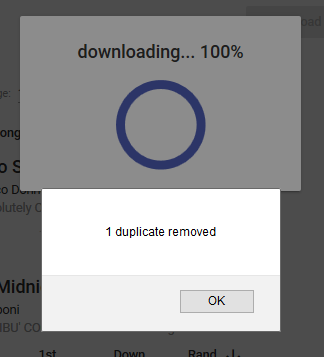
It was simpler for me to make Shufflizer delete duplicates than to make it accommodate them.  A fundamental motivation for Shufflizer is to not hear songs repeated.  Having the same song more than once in a playlist undermines this.

Local files

Shufflizer automatically removes local files from your playlist.  When it does this, it lets you know with an alert.
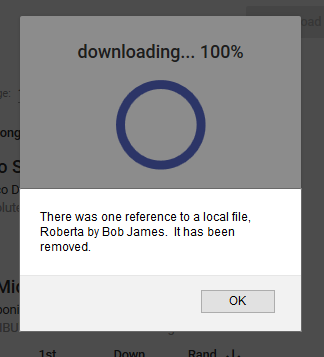
Probably most Spotify users don’t have local files in their playlists, or even know what they are.  Local files are mp3’s you have on your PC that you want Spotify to play.  They are not supported by the underlying technology upon which Shufflizer is built, the Spotify Web API, so I must remove them.

Don’t like these automatic actions?

Shufflizer isn’t immediately changing your playlist in Spotify when you see either of these alerts, and it certainly isn’t going to delete any files from your PC.  Shufflizer is making these adjustments to the copy of the playlist it is loading for you to edit.  A playlist is just a track listing, not the songs themselves, and no changes to your playlist are saved until you upload.  Don’t like these automatic actions?  Don’t upload.


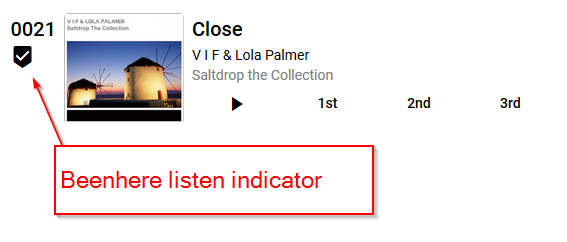
Beenhere listen indicator

Shufflizer knows what songs you have listened to recently.  These are indicated with a beenhere icon.  Beenhere is a concept from maps, a symbol to indicate places on a map that you have visited.  Shufflizer uses it to indicate songs that you have listened to.

Beenhere songs will be put at the end of the playlist the next time you randomize.  Sometimes you don’t want this.  Maybe you were auditioning a song deciding whether to add it to the playlist and don’t want this to count as a listen.

Beenhere can be cleared

You can clear the beenhere indicator by clicking on it.  Now the song is treated as a song that has not yet played.

Adding new songs

You want to hear your playlist randomized.  You don’t want to hear recently played songs.  So you are using Shufflizer instead of Spotify shuffle play, and you listen to the playlist in its song order.

Adding new songs

In Spotify you find some new songs and add them to the playlist.  Spotify always puts them last.  You might want to hear some of these songs early in your mix because you are excited about them.  If not, then you at least want them randomized into the mix, instead of at the end.  So before you resume listening to the playlist, you use Shufflizer again:

  • Download playlist from Spotify
  • Jump to the end (where the new songs are)
  • Clear the beenhere listen indicator on some songs
  • Shoot some songs to the top
  • Jump to the top
  • Change the order of the first few songs
  • Shufflize
  • Upload playlist to Spotify

Now in Spotify, simply start listening from the top.

Once you are accustomed to doing this, it doesn’t take more than sixty seconds.

My Spotify app

I am creating a Spotify app using Angular.  I aim to provide an alternative to Spotify’s shuffle play.

Spotify shuffle play

Spotify does not document for us the internals of their shuffle play mechanism, but it seems to construct a new random selection from your playlist whenever you return to the playlist after listening to something else.  I call this resampling.  The problem with resampling is that a song that you have recently heard might play again while there are other songs in your playlist that have not yet played once.

Use my shuffle instead

My solution is to provide an external utility that shuffles the playlist itself, rather than just making random selections from it for the play queue.  Then the user can turn off Spotify’s shuffle and listen to the randomized playlist in its new order.  The effect is much like Spotify’s shuffle play but each song plays just once.

Until you start from the top again.

Or give up and simply go back to using Spotify’s shuffle play.

Because you got lost.

When you return to a big playlist it’s practically impossible find where you left off, assuming you even remember.

Use my shuffle again

So there is a bit more to my solution.  My shuffle knows what you have listened to and puts these songs at the end.

Returning to your big playlist?  Use my utility to shuffle it again.  Then in Spotify simply start listening from the top. The songs will be in random order.  You will not hear recently played songs.  You don’t have to find where you left off.

Still under development

My shuffle utility is my project for learning Angular.  So I am taking my time with it.  But it’s pretty far along now, so I expect to make a version of it available soon.  I will continue to talk about it – a few more features it has, and also some of the challenges behind the scenes both with Angular and with the Spotify API – in future blog posts.